
Waterfall Spectrogram (ID=7003)
Obsolete, please use Waterfall Spectrogram II instead. Due to its status, it is normally installed as a hidden add-on. Please use Windaq Add-on Manager to add it to Windaq's menu if you wish to use it
A Windaq add-on uses the free FFT1024 ActiveX control to visualize the frequency domain of an analog waveform in real-time, with 3D color-scaled waterfall spectrogram for history display, by eavesdropping on the data stream in DATAQ's WinDaq acquisition software.
If you can't see the video above, please click this youtube link directly
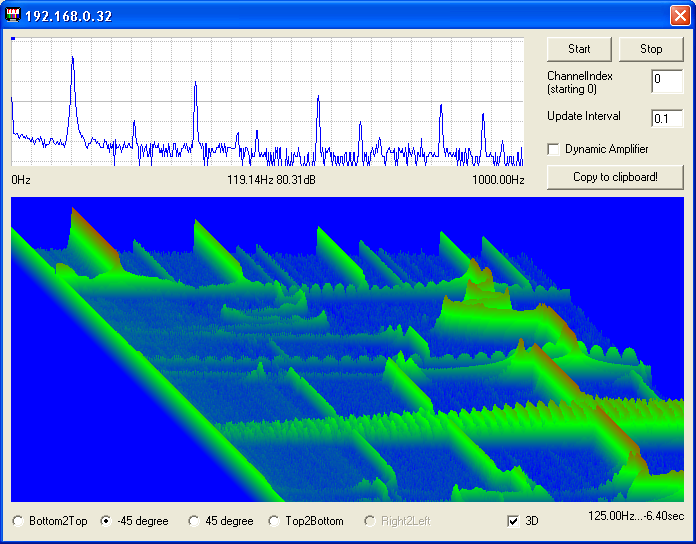
- While acquiring spectrum, you may use the mouse to drag the FFT spectrogram (in the upper chart) up and down, or double-click the buttons to change the scaling of the spectrogram.
- Multiple Spectrograms can be enabled for different channels under Windaq
- Once you stop the spectrogram, you may click on the spectrogram to enable a cursor and drag it horizontally to study the spectrum
- You may also click on the waterfall chart to enable a crosshair to show the frequency/elapsed time
-
Waterfall chart is sizable for more history
display

- Channel number is a 0-based index to Windaq's scanlist. For example, if Windaq has channel 3,4,6,7 enabled, one can enter 0 for channel 3, 1 for channel 4, 2 for channel 6 and 3 for channel 7.
- Intelligent Channel Select: Highlight/Select a channel in Windaq and fire up this Windaq add-on, and it will use the selected channel as its default channel
-
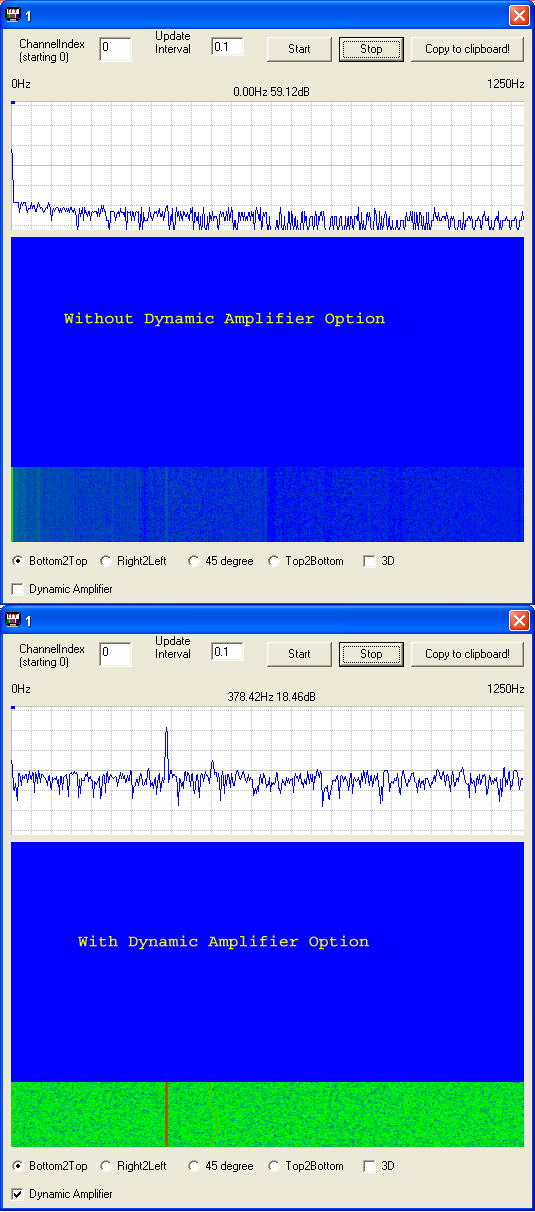
Dynamic Amplifier option: FFT1024's
resolution is about 10-bit, thus weak frequency components will
be buried in the noise. To address this problem, Dynamic
Amplifier option is created.
When checked, waveform's average DC component is removed, then
amplified to at least half dynamic range, before performing FFT. As
the result, low level signal is much easier to study. See below for
the demonstration. This option
becomes obsolete if you move to Spectrogram
II.
- Due to Windaq's memory allocation approach, up 29 channels can be enabled in Windaq if you wish to use this add-on
- For better performance, please switch to the second generation of Windaq Add-on, Spectrogram II
Bonus for users with paid registration :
- No ad-line in the charts
- No run time limit
To Use WinDaq Add-ons
Confirm WinDaq 3.16 or higher is installed on your computer
Install WinDaq add-ons.
Start WinDaq, and you will find the WinDaq add-ons integrated into Windaq->View->Add-ons menu (see the screen capture above).
Intelligent Channel Selection: Highlight/Select a channel in WinDaq and fire up the WinDaq add-on you wish, and the WinDaq add-on will use the selected channel as its default channel.
If channel index number is required for a WinDaq add-on, please enter the 0-based index to Windaq's scanlist. For example, if WinDaq has channel 3,4,6,7 enabled, one can enter 0 for channel 3, 1 for channel 4, 2 for channel 6 and 3 for channel 7.
Do not change WinDaq's configurations while WinDaq add-ons are running, or some add-ons may terminate.
Last update: 02/28/22
© www.UltimaSerial.com